Introduction
A library is rarely just one big room. It's got circulation desks, reference sections, study rooms, meeting spaces, and a classification system that can baffle even veteran readers. For a first-time visitor, that complexity can feel overwhelming.
Research backs this up. A JHU-hosted study of multilingual students at a New York City College of Technology library found task success rates of just 58%, 83%, and 42% across three basic tasks: locating a novel, a reserve textbook, and a DVD.
Students appeared visibly anxious once they moved away from service points.
When signage fails, the fallout is predictable: frustrated patrons, repeated questions at the reference desk, and entire collections that go unused simply because nobody could find them. Good wayfinding does the opposite. It builds confidence and lets people explore on their own.
This guide covers library signage types, core wayfinding principles, ADA compliance requirements, and how to choose a signage manufacturing partner that gets the details right.
Key Takeaways
- Library signage splits into interior and exterior categories, spanning six distinct functional types
- Strong wayfinding blends architecture, landmarks, and signage placed at key decision points
- ADA compliance for contrast, character height, and mounting placement is a federal legal requirement
- Treat your signage system as a living document that needs regular audits and a written maintenance policy
What Is Library Signage? Understanding the Types
Library signage is any physical or visual element that identifies, directs, informs, restricts, or permits patron behavior inside and outside the building. It's the staff member on duty around the clock, answering the same questions repeatedly without ever getting tired of them.
Most libraries need both interior and exterior signage systems. Exterior signs get visitors to the right entrance. Interior signs take over from there, guiding people through departments, service points, and collections.
Interior Signage Categories
Inside the building, signs generally fall into a few groups:
- Identification signage: service points, office and room numbers, elevators, restrooms
- Directional signage: arrows and labels pointing toward departments or amenities
- Orientation signage: floor directories, call number range markers, "you are here" maps
- Regulatory signage: fire exits, alarm pulls, and other life-safety signs
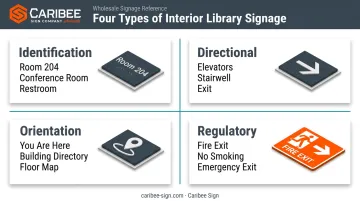
Regulatory signage deserves special attention because it protects patrons and keeps buildings code-compliant. Fire exits and alarm pulls must stay ADA-visible and unobstructed at all times, no exceptions, even during renovations or temporary displays.
Exterior Signage Categories
Outside, the job is simpler but just as important: get people to the door, which means:
- Site identification signage (building name, address)
- Entrance and exit markers
- Accessible parking signage
- Directional signs guiding visitors from parking lots or sidewalks to the entrance
Functional Signage Types
Beyond location, signs also serve specific functions:
- Promotional signage: event flyers, new-release displays, program announcements
- Policy signage: "quiet zone" notices, food and drink rules, borrowing limits
- Instructional signage: copier directions, self-checkout steps, Wi-Fi login instructions
Behind many of these categories sits physical hardware that has to be manufactured to spec. Caribee Sign manufactures that hardware for trade partners, including room identification signs, ADA and Braille signage, and directional and directory systems used across libraries, schools, and other institutional buildings.
Wayfinding Design Principles in Libraries
Signage is one piece of a much larger strategy called wayfinding: the process of helping people orient themselves and move confidently through a space. Maps, landmarks, and architectural cues do the rest of the work alongside signs.
Types of Wayfinding Elements Used in Libraries
Libraries lean on several wayfinding tools beyond signs:
- Visual identity zones: distinct colors or shapes assigned to each floor or department
- Landmarks: staircases, columns, or focal walls that give people a mental anchor
- Sightlines: open views that reveal decision points before patrons reach them
- Wall maps and printed directories: static overviews for orientation
- Digital wayfinding tools: kiosks or apps that supplement physical signs
The International Health Facility Guidelines' wayshowing principles apply directly here: keep circulation paths simple, place signage at decision points, and avoid overloading visitors with information they don't need yet.
The Wayfinding Design Process
A defensible wayfinding system follows a research-driven process:
- Research the audience: identify who uses the space and how, whether that's students, researchers, families, or first-time visitors
- Analyze usage data: review circulation stats, service desk questions, and complaint patterns
- Map user pathways: trace common routes from entrance to destination and back
- Identify decision points: pinpoint spots where people pause, hesitate, or backtrack
- Select appropriate sign types: match orientation, directional, or identification signs to each decision point
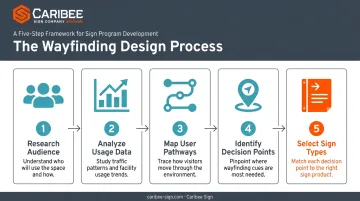
This process matters because awareness gaps are real. A national Pew Research survey of more than 2,200 Americans found only 22% knew all or most services their library offered, while 31% knew little or nothing at all (Pew Research, Library Services in the Digital Age).
Signage alone won't close that gap. A wayfinding system that surfaces collections and services as people move through the building can make a real dent.
Signage Design Guidelines & Best Practices
Good signage follows a few unglamorous but critical rules.
Legibility fundamentals:
- Use succinct, plain-language text; skip library jargon without explanation
- Choose sans-serif typefaces for cleaner reading at a distance
- Size fonts appropriately for the viewing distance, not just for what looks good up close
Once legibility is locked in, consistency keeps every sign speaking the same visual language across the building.
Consistency requirements:
- Standardize typeface, color palette, and vocabulary across every sign in the building
- Document these choices in a written style guide so future signs match, even years later
ADA Compliance Standards for Library Signage
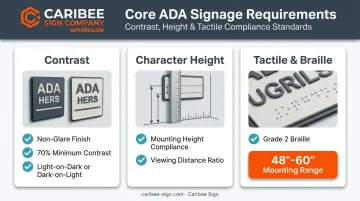
The 2010 ADA Standards set the legal baseline here, and a couple of common "rules of thumb" don't actually match the federal standard.
Contrast: The ADA requires non-glare finishes and either light-on-dark or dark-on-light contrast between characters and background. There's no specific percentage written into the law itself.
A commonly cited "70%" figure actually traces back to RNIB accessibility guidance, which recommends a 70-point Light Reflectance Value difference, a useful design target, but not an ADA mandate (U.S. Access Board, Chapter 7: Communication Elements and Features).
Character height: ADA Table 703.5.5 sets minimums by mounting height and viewing distance, not a flat "1 inch per 10 feet" rule:
| Mounting Height | Viewing Distance | Minimum Character Height |
|---|---|---|
| 40-70 inches | Up to 6 feet | 5/8 inch |
| 40-70 inches | Beyond 6 feet | 5/8 inch, plus 1/8 inch per additional foot |
| 71-120 inches | Up to 15 feet | 2 inches |
| Above 120 inches | Up to 21 feet | 3 inches |
Tactile and Braille: Room-identification signs need raised characters (at least 1/32 inch) plus Grade 2 Braille placed below the text, with a baseline mounted between 48 and 60 inches from the floor.
Strategic Sign Placement
Placement matters as much as design. Put signs where decisions actually happen, not where they're convenient to install.
- Position signage at true decision points: intersections, department entrances, elevator landings
- Keep sign viewing space clear of furniture or displays that block sightlines
- Layer information progressively, general orientation first, specific details as people get closer to their destination
Maintaining an Effective Signage System
Signage isn't a one-time install. Collections move, departments get renamed, and services change, so signs need to keep up.
A 2016 audit at the UTS Library cataloged 54 distinct types of printed signs throughout the building. Staff removed 17 immediately as redundant or outdated, including one paper sign that had been taped up for a decade (UTS Library, Signage by Design case study).
That kind of clutter creeps in fast. Watch for:
- Ad hoc printed signs taped up "temporarily" that never come down
- Negative or scolding policy signs that create an unwelcoming tone
- Duplicate signs saying the same thing in different words
The fix: assign an owner and build a formal signage policy document covering:
- Approved templates and style guidelines
- Controlled vocabulary, so "Restroom" doesn't become "Bathroom" three signs later
- Stakeholders responsible for approvals
- A regular audit schedule, whether that's monthly walk-throughs or an annual deep review
Choosing the Right ADA-Compliant Signage Partner
Non-compliant signage creates real legal exposure. Incorrect character height, missing Braille, or poor contrast can leave institutions vulnerable to accessibility complaints and costly retrofits.
When evaluating a signage manufacturer, look for:
- Proven ADA compliance expertise: backed by documented experience with tactile characters, Grade 2 Braille, and mounting specifications
- Consistent quality across orders: critical for multi-building campuses or phased rollouts where new signs must match what's already installed
- Responsiveness: libraries and institutions often need fast turnarounds for renovations, new wings, or corrected signage
Caribee Sign checks each of these boxes.
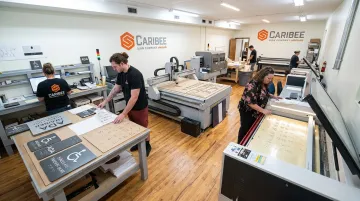
The company manufactures ADA-compliant signage for sign companies and trade professionals nationwide from its production facility in St. Louis, Missouri. In-house capabilities including CNC routing, laser engraving, and precision fabrication mean tactile characters and Braille are handled without third-party delays. Braille translation is included as well, so partners don't have to supply their own copy.
Hugh Welch of Hugh-Carolina Sign Co. put it plainly:
"They're easy to work with, super responsive, provide excellent customer service, and deliver high-quality products that meet all requirements. They're a reliable partner we're always happy to work with."
For sign companies handling library, school, or campus projects, that kind of consistency behind a wholesale quote request matters just as much as the sign itself.
Frequently Asked Questions
What is signage in a library?
Library signage refers to the physical and visual system used to identify, direct, inform, and regulate patron movement and behavior throughout the building. It includes everything from room identification signs to fire exit markers and event promotion displays.
What are the types of wayfinding in library design?
Library wayfinding combines architectural cues like landmarks and sightlines, signage-based tools such as directories and directional signs, and printed or digital aids like maps and apps. Together, these elements help patrons build a mental map of the space.
What are the guidelines for wayfinding signage design in libraries?
Core guidelines include plain-language legibility, consistent typefaces and color palettes, full ADA compliance, and placing signs at genuine decision points rather than scattering them throughout the building. A written style guide keeps standards consistent over time.
What is ADA-compliant signage for a library?
ADA-compliant signage meets specific federal requirements for character height, tactile and Braille elements, non-glare contrast, and mounting placement, which the U.S. Access Board defines in its 2010 ADA Standards. Room identification signs generally require both tactile and visual characters.
How often should library signage be updated or audited?
There's no universal legal interval, but most libraries benefit from periodic walk-through checks plus a more comprehensive annual review. Updates should also happen whenever collections, departments, or services change.
How much does library signage typically cost?
Costs vary widely based on sign count, materials, mounting complexity, and whether the project includes Braille or custom finishes. Rather than expecting a fixed number, request a full sign inventory and location schedule before comparing vendor quotes.