Confusing or non-compliant signage does not just annoy travelers. It creates bottlenecks at pinch points, adds stress to an already tense experience, and exposes airport operators to real ADA liability.
This guide breaks down the types of airport wayfinding signage, the ADA specifications that govern them, and what sign companies need from a manufacturing partner to bid and fulfill these contracts with confidence.
Key Takeaways
- Airport wayfinding blends directional, informational, and regulatory signage into one system
- ADA compliance (raised characters, Braille, height, contrast) is required, not optional
- Static and digital signage work best combined, not as an either/or choice
- A dependable ADA-focused manufacturer cuts compliance risk on large, multi-terminal orders
What Is an Airport Wayfinding System?
An airport wayfinding system is the coordinated network of physical signs, digital displays, maps, and symbols that answer two questions for every traveler: where am I, and where do I need to go next.
Two related terms often get confused, but they describe different things:
| Term | Definition |
|---|---|
| Wayfinding | The decision-making process — the mental work of figuring out a route |
| Navigation | The physical act of walking that route |
A good signage system supports the thinking part so the walking part feels automatic.
The stakes are high. According to IATA's 2024 Global Passenger Survey, 70% of carry-on-only passengers expect to reach their gate within 30 minutes, and 74% of checked-bag passengers expect no more than 45 minutes. Every unnecessary pause at a confusing junction eats into that window.
That expectation gap is exactly why airport signage can't rely on guesswork. Every sign in the terminal needs a clear job to do.
Types of Airport Wayfinding Signage
Airport signage typically falls into four categories: directional, informational, regulatory/ADA, and digital. Each solves a different piece of the passenger journey, and none of them work well in isolation.
Directional Signage
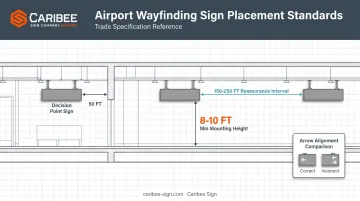
Directional signs do their heaviest lifting at decision points, meaning gate junctions, security entrances, baggage claim splits, and ground transportation exits. Placement matters more than most people assume.
The FAA's guidance in AC 150/5360-12F calls for signs to appear before a decision point with enough distance for a traveler to read, process, and react. On long corridors without a major junction, reassurance signs every 150-250 feet help travelers confirm they're still on track.
Overhead signage should hang with the bottom edge at a minimum of 8 feet, rising to 10 feet in large, high-ceiling concourses.
Consistency matters just as much as placement:
- Position left arrows to the left of the message, right arrows to the right
- Keep arrows from pointing into a block of text
- Match terminal-wide symbol sets (AIGA/DOT icons) identically from Concourse A to Concourse F
- Maintain uniform typography and sign color across every vendor and phase of construction
A traveler who sees three different arrow styles in one terminal will hesitate. That hesitation adds up across thousands of passengers a day.
Informational Signage
This category covers Flight Information Display Systems (FIDS), terminal maps, and amenity signs pointing to restrooms, lounges, and transportation.
FIDS boards work best when they include city, airline, flight number, gate, and real-time status (on-time, delayed, canceled). The FAA recommends spacing concourse display banks roughly every 250 feet at major decision points.
Terminal maps need a heads-up orientation: the top of the map matches the direction the traveler is actually facing. SFO's wayfinding program pairs this with walk-time estimates on its "You Are Here" displays, giving travelers a concrete number instead of a vague sense of distance.
Regulatory & ADA-Mandated Signage
TSA divides checkpoint signage into mandatory, instructional, directional, and local categories, and headquarters controls the approved templates. Sign companies working checkpoint contracts need to use current TSA content rather than redesigning it.
This category also includes:
- Customs and Federal Inspection Services signage, coordinated with CBP
- Emergency exit and egress identification, following NFPA 101 visibility and illumination rules
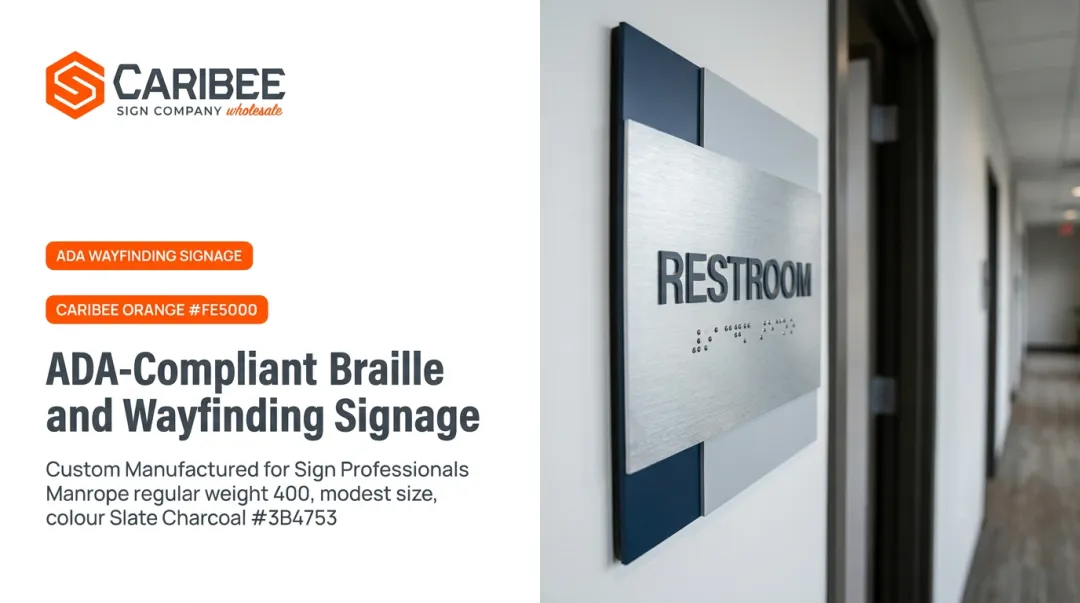
- ADA-required tactile and Braille signage at permanent room and exit identification points
That last item deserves its own deep dive, since it's the part of the project with the least tolerance for error.
Digital & Dynamic Formats
Static and ADA signage handle the permanent, high-stakes information, but plenty of details change faster than a printed sign can track. LED displays, interactive kiosks, and dual-purpose wayfinding/advertising screens fill that gap by updating in real time. ACI's 2022 Global Traveller Survey found that 75% of passengers are likely to use real-time information tools, with strong interest in self-service and remote processing as well.
Digital screens are the right tool for gate changes, security wait times, and walking-time estimates. They are the wrong tool for anything ADA requires to be permanent and tactile.
ADA Compliance Requirements for Airport Signage
ADA compliance is a specification requirement from day one, not a final design check. The details are unforgiving.
Which signs need tactile characters and Braille? Permanent room and space identification signs, specified exit-door identification, and rail-station identification all require it. Most directional and informational signage can remain visual-only.
For signs that do require tactile elements, the 2010 ADA Standards spell out exact tolerances:
| Requirement | ADA Specification |
|---|---|
| Raised character height | 5/8 in to 2 in |
| Raised depth above background | 1/32 in minimum |
| Braille dot base diameter | 0.059-0.063 in |
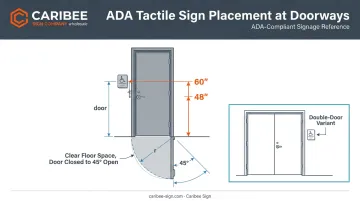
| Tactile baseline height | 48 in min, 60 in max above floor |
| Overhead clearance | 80 in minimum |
Source: U.S. Access Board, Chapter 7: Signs
Placement Rules That Get Overlooked
Tactile signage location isn't just about height. Door-mounted signs belong on the latch side of a single door, or the right side of a double door.
That clear floor space must stay unobstructed through the full door swing, from closed to 45 degrees open. Skip this detail, and you'll be pulling signs off the wall during final inspection.
Contrast matters too. ADA requires characters and backgrounds to be non-glare, with light-on-dark or dark-on-light contrast. There's no specific numeric ratio in the federal standard, but auditors will flag anything that reads as low-contrast in practice.
Why This Can't Be a Late-Stage Fix
Non-compliance carries real financial exposure. ADA Title III federal lawsuits hit 8,800 filings in 2024, a 7% increase over the prior year, and that figure doesn't include state-court claims.
A 2021 DOJ settlement required the Port Authority of New York and New Jersey to remediate accessibility barriers at Newark's rail station — a reminder that transit and airport facilities draw direct enforcement attention.
For a project spanning hundreds of sign locations across multiple terminals, one overlooked mounting height or missing Braille translation can mean re-fabricating an entire order.
Sourcing every tactile sign from a single manufacturer closes that gap. Caribee Sign builds ADA specs into its in-house CNC routing and laser engraving process from the start, rather than leaving compliance to be assembled after the fact across multiple suppliers.
Best Practices for Airport Wayfinding Design
Good airport signage design follows a few consistent principles, regardless of terminal size.
Lead with pictograms, not paragraphs. International travelers arrive speaking dozens of languages. ICAO Doc 9636 remains the reference standard for airport and marine terminal symbols, and pairing those icons with brief English text keeps messages universal.
Use progressive disclosure. Instead of showing a full terminal map at every junction, present only the next decision a traveler needs to make. Confirm the choice was correct once they've made it, then repeat at the next junction. This keeps cognitive load low without sacrificing route continuity.
Design for constant change. Gates get reassigned, retail tenants rotate, and airlines merge terminals, often within the same year. A signage system needs to absorb that churn without a full reprint:
- Modular static panels with swappable inserts, sourced from wholesale manufacturers like Caribee Sign, handle tenant and gate changes without new fabrication
- CMS-integrated digital signage handles anything that changes daily or hourly
- A clear line separates what's permanent (tactile ID signs) from what's built to be swapped
Getting this balance wrong means either a terminal full of outdated signs or an unnecessarily expensive all-digital buildout.
Partnering with the Right ADA Signage Manufacturer
Airport contracts don't look like a typical office building order. You're specifying hundreds of ADA-compliant signs across multiple terminals, often on a tight construction timeline with zero room for a failed inspection.
That scale changes what you need from a manufacturing partner. A single missed Braille dot tolerance or wrong mounting height, multiplied across 300 sign locations, becomes a very expensive mistake.
Caribee Sign has built its business around exactly this kind of consistency. Sign companies like Hugh-Carolina Sign Co. describe Caribee as their "go-to company for all of our ADA signage needs," citing responsiveness and products that consistently meet requirements order after order.
That kind of repeat relationship matters more on a 300-sign airport contract than it does on a five-sign office job.
When evaluating a manufacturing partner for an airport project, check for:
- In-house production (CNC routing, laser engraving) rather than outsourced fabrication, which limits quality variance
- Braille translation handled internally, so your team isn't sourcing Grade 2 Contracted Braille copy separately
- Fast quote turnaround, since airport bid timelines rarely leave room for slow vendor responses
- A track record with other sign companies on repeat, high-volume ADA orders

Caribee ships nationwide from its St. Louis, Missouri facility and sells exclusively to sign companies and trade professionals, meaning your client relationship stays yours.
For a project where hundreds of signs need to match perfectly across multiple terminals, that single-source consistency is worth more than a marginally lower per-sign price from a vendor juggling three subcontractors.
Frequently Asked Questions
What types of airport wayfinding signs are there?
Airport signage falls into four categories: directional (gates, security, baggage), informational (FIDS, maps, amenities), regulatory/ADA (TSA, exits, tactile signage), and digital displays for real-time updates.
What is the airport wayfinding system?
It's the coordinated network of physical signs, digital displays, and maps that far enough ahead of a junction for travelers to read and react before turning.
Who is responsible for ensuring airport signage meets ADA compliance?
Responsibility is shared. Airport operators and designers set the specifications, while the signage manufacturer is responsible for producing every sign to match those tolerances exactly.